Showing posts with label Manual. Show all posts
Showing posts with label Manual. Show all posts
Thursday, October 9, 2014
Samsung SCH W699 Specs
Samsung SCH-W699 is a clam shell cell phone from Samsung mobiles, this is a dual SIM card phone that work on GSM and CDMA network. For the GSM, it work on bands 900 / 1800 / 1900 while for the CDMA network, it work on 800/1900. This phone was released to the market on 2009, August. In this post, today we provide some information related to the Samsung SCH-W699 including the review and the full phone specs explanation. For the user manual, it doesnt available online, maybe it distributed in the sales package.

The dimensions of Samsung SCH-W699 is 98 x 56 x 19.9 mm with weight about 120 g, on the display it use TFT touchscreen, 256K colors and the screen resolution is 240 x 320 pixels. The screen width is 2.8 inches. Besides the main display, it also has External TFT touchscreen, 256K colors, the screen resolution is 240 x 320 pixels and the screen width is 2.4 inches. For alert tones, you can use mp3 files as your own ringtone.
On the data storage, Samsung SCH-W699 equipped with external memory card slot for microSD. The maximum space that recognized by the system is up to 8 GB. The phone memory can save up to 1000 phone numbers.
On the connectivity, Samsung SCH-W699 can be connected to the internet via GPRS and EDGE network, the GPRS class is Class 10 (4+1/3+2 slots), 32 - 48 kbps, while for the EDGE speed is up to 236.8 Kbps. To exchange data with another gadgets, you can use Bluetooth and USB port. The Bluetooth version is v2.0 with A2DP while the USB version is v2.0.
Now, we talking about the camera feature. Samsung SCH-W699 equipped with camera 5 megapixel with resolution up to 2592 х 1944 pixels. The features included in this camera are autofocus, LED flash. In addition to take a picture, the camera also support for video recording with quality VGA@15fps.
Here are some features that offered by Samsung SCH-W699:
On the data storage, Samsung SCH-W699 equipped with external memory card slot for microSD. The maximum space that recognized by the system is up to 8 GB. The phone memory can save up to 1000 phone numbers.
On the connectivity, Samsung SCH-W699 can be connected to the internet via GPRS and EDGE network, the GPRS class is Class 10 (4+1/3+2 slots), 32 - 48 kbps, while for the EDGE speed is up to 236.8 Kbps. To exchange data with another gadgets, you can use Bluetooth and USB port. The Bluetooth version is v2.0 with A2DP while the USB version is v2.0.
Now, we talking about the camera feature. Samsung SCH-W699 equipped with camera 5 megapixel with resolution up to 2592 х 1944 pixels. The features included in this camera are autofocus, LED flash. In addition to take a picture, the camera also support for video recording with quality VGA@15fps.
Here are some features that offered by Samsung SCH-W699:
- WAP 2.0/xHTML browser
- Stereo FM radio with RDS
- Games
- GPS
- Java support
- Dual SIM
- MP3/WAV/WMA/AAC+ player
- MP4/DivX/H.264/H.263/ player
- Document viewer (Word, Excel, PowerPoint, PDF)
- Voice memo

Saturday, October 4, 2014
Samsung Galaxy Camera Specs
In this month (2012, August), Samsung announcing their latest gadget called Samsung Galaxy Camera, it is not a cell phone because it cant used as voice communication both on GSM or CDMA network. For the operating system, it use Android OS, v4.1 (Jelly Bean) and supported by Quad-core 1.4 GHz Cortex-A9 CPU and 1 GB of RAM. The main feature of this Samsung gadget is the camera quality that has resolution up to 16 MP and support up to 21x optical zoom. Here, we provide the full specs of Samsung Galaxy Camera, for the user manual will be available later.

Here is the Samsung Galaxy Camera specs, the user manual download link will be available here after the phone released to the market.
| GENERAL INFO | |
|---|---|
| 2G network | - |
| 3G network | HSDPA 850 / 900 / 1900 / 2100 |
| 4G network | LTE |
| Status | Coming soon. Exp. release 2012, Q4 |
| SIZE | |
|---|---|
| Dimensions | 128.7 x 70.8 x 19.1 mm |
| Weight | 305 g |
| DISPLAY | |
|---|---|
| Type | Super Clear LCD capacitive touchscreen, 16M colors |
| Size | 720 x 1280 pixels, 4.8 inches (~306 ppi pixel density) |
| Features | Corning Gorilla Glass, TouchWiz UI, |
| SOUND | |
|---|---|
| Alert types | - |
| Loudspeaker | Yes |
| 3.5 mm jack | Yes |
| MEMORY | |
|---|---|
| Phone book | - |
| Call records | - |
| Internal | 8 GB storage, 1 GB RAM |
| Card slot | microSD, up to 32 GB |
| DATA | |
|---|---|
| GPRS | - |
| EDGE | - |
| 3G | HSDPA, 21 Mbps; HSUPA, 5.76 Mbps; LTE (optional) |
| WLAN | Wi-Fi 802.11 a/b/g/n, DLNA, Wi-Fi hotspot |
| Bluetooth | Yes, v4.0 with A2DP, EDR |
| Infra Red Port | - |
| USB | Yes, microUSB v2.0 |
| CAMERA | |
|---|---|
| Primary | 16 MP, autofocus, 21x optical zoom, pop-up Xenon flash, AF light |
| Features | Wide-angle 23mm lens, geo-tagging, touch focus, face and smile detection, optical image stabilization |
| Video | Yes, 1080p@30fps, 720x480@120fps slow-mo |
| Secondary | - |
| FEATURES | |
|---|---|
| OS | Android OS, v4.1 (Jelly Bean) |
| CPU | Quad-core 1.4 GHz Cortex-A9 |
| Messaging | SMS(threaded view), MMS, Email, Push Mail, IM, RSS |
| Browser | HTML5 |
| Radio | - |
| Games | - |
| Colors | Black, White |
| GPS | Yes, with A-GPS support and GLONASS |
| Java | Yes, via Java MIDP emulator |
| Other features | HDMI port, Active noise cancellation with dedicated mic, TV-out (via MHL A/V link), SNS integration, MP4/DivX/XviD/WMV/H.264/H.263 player, MP3/WAV/eAAC+/AC3/FLAC player, Organizer, Image/video editor, Document editor (Word, Excel, PowerPoint, PDF), Google Search, Maps, Gmail, YouTube, Calendar, Google Talk, Picasa integration, Voice memo/dial/commands, Predictive text input (Swype) |
| BATTERY | |
|---|---|
| Type | Standard battery, Li-Ion 1650 mAh |
| Stand-by | - |
| Talk time | - |
| Music Play | - |
Sunday, September 28, 2014
Samsung Galaxy Core I8260 Specification Review and Manual
Samsung Galaxy Core I8260 is also available as Samsung Galaxy Core I8262 with Dual SIM card slot, this smartphone was announced on May and the plan, it will be released to the market on 2013, July. This Galaxy Core I8260 work on GSM network and support both for 2G and 3G network. In this post, today we provide the full phone specification. For the user manual document, you can download it here later.

Some features that offered by the Samsung Galaxy Core I8260 including data connection speed up to 7.2 Mbps, WiFi connection, 5 MP camera, FM radio with RDS, GPS, and many others. For the operating system, the Galaxy Core I8260 use Android OS, v4.1.2 (Jelly Bean) that supported by dual core 1.2 GHz CPU. Here are the full phone specification.
| GENERAL INFO | |
|---|---|
| 2G network | GSM 850 / 900 / 1800 / 1900 - GT-I8260, GSM 850 / 900 / 1800 / 1900 - GT-I8262 (SIM 1 & SIM 2) |
| 3G network | HSDPA 900 / 2100 |
| Announced | - |
| Status | Coming soon. Exp. release 2013, July |
| SIZE | |
|---|---|
| Dimensions | 129.3 x 67.6 x 9 mm (5.09 x 2.66 x 0.35 in) |
| Weight | 124 g (4.37 oz) |
| DISPLAY | |
|---|---|
| Type | TFT capacitive touchscreen |
| Size | 480 x 800 pixels, 4.3 inches (~217 ppi pixel density) |
| Features | Multitouch support |
| SOUND | |
|---|---|
| Alert types | Vibration; MP3, WAV ringtones |
| Loudspeaker | Yes |
| 3.5 mm jack | Yes |
| MEMORY | |
|---|---|
| Phone book | - |
| Call records | - |
| Internal | 8 GB, 1 GB RAM |
| Card slot | microSD, up to 64 GB |
| DATA | |
|---|---|
| GPRS | Yes |
| EDGE | Yes |
| 3G | HSDPA, 7.2 Mbps; HSUPA, 5.76 Mbps |
| WLAN | Wi-Fi 802.11 b/g/n, Wi-Fi hotspot |
| Bluetooth | Yes, v3.0 |
| Infra Red Port | - |
| USB | Yes, microUSB v2.0 |
| CAMERA | |
|---|---|
| Primary | 5 MP, 2592x1944 pixels, autofocus, LED flash |
| Features | Geo-tagging, touch focus, face and smile detection |
| Video | Yes, 480p@30fps |
| Secondary | Yes, VGA |
| FEATURES | |
|---|---|
| OS | Android OS, v4.1.2 (Jelly Bean) |
| CPU | Dual-core 1.2 GHz |
| Messaging | SMS(threaded view), MMS, Email, Push Mail, IM, RSS |
| Browser | HTML |
| Radio | FM radio with RDS |
| Games | - |
| Colors | White, Blue |
| GPS | Yes, with A-GPS support |
| Java | Yes, via Java MIDP emulator |
| Other features | SNS integration MP4/WMV/H.264/H.263 player MP3/WAV/eAAC+/AC3/FLAC player Organizer Image/video editor Document viewer Google Search, Maps, Gmail, YouTube, Calendar, Google Talk, Picasa Voice memo/dial Predictive text input |
| BATTERY | |
|---|---|
| Type | Li-Ion 1800 mAh battery |
| Stand-by | - |
| Talk time | - |
| Music Play | - |
Sunday, September 21, 2014
Manual Update Galaxy Note 8 0 N5100 with XXBMF1 Jelly Bean 4 1 2 Firmware
Galaxy Note 8.0 N5100 can now be updated with the Official Android 4.1.2 XXBMF1 Jelly Bean Firmware which comes with the added stability and bug fixes. Just in case if you still haven’t got the update of this firmware, you can now manually update the same. The best part of this update is that this is the Official firmware and not the beta or custom ROM firmware. Before we proceed to check on what are the instructions to apply with this firmware, you will need to follow the list of pre requisites which we have mentioned below.

Note: Applying with this firmware won’t root / void the warranty in any manner.
Quick Pre Requisites:
- Create a backup of all your data with the help of below mentioned steps. Though, you can back up the data with KIES as well, we recommend you to backup manually with the help of below mentioned steps as sometimes KIES refuses to detect the device.
SMS – Use “SMS Backup & Restore app”,
Contacts – Sync with the Gmail application,
Call Log - Call Log and Restore
Images, Songs, Videos, Files – Copy to internal / External SD Card,
APN and MMS Settings – Note down from the path “Applications > Settings > Wireless and Network > Mobile Networks > Access Point Names”
- From the path “Settings > Development Options > USB debugging” enable the USB Debugging Mode. Minimum charge left in your phone is 30% or else there is a risk of device getting turned off in the middle of rooting process.
Disclaimer: Follow all the instructions mentioned in this article as if there is any damage caused due to not following instructions then we shall not be held liable or responsible. Just in case if you face any issues then we will try our level best to address the same.
Assuming that you are done with all the above mentioned steps, you can now proceed to the next step where we have mentioned the detailed guide on how to apply with this firmware update.
Procedure to Update Galaxy Note 8.0 N5100 with Jellybean 4.1.2 Firmware:
- Download the Jellybean 4.1.2 Firmware Package and Odin from here to your computer. Once downloaded, extract both the files in your computer and open Odin in your computer.
- Open Odin in your computer. Download Mode in Galaxy Note 8.0 can be entered by first turning Off the device and then hold Volume Down Rocker Key + Menu Button and then Power ON the device. Once the device is booted and you see the Download Mode Green Robot, you can release the button combos.
- Connect your device to the computer with the help of original USB cable and then you will see that the ID : COM section will turn Yellow / Green, indicating that all the drivers are installed successfully.
- Click on “PDA” to select the tar file which you got from the firmware package which is the TAR File which you got after extracting the file from the first step.
- Once all the file is selected, click on “Start” to start the process of firmware update. Once the firmware update process is completed which will be mentioned in the ODIN, the Galaxy S2 device will be rebooted.
- For firmware update to be finished, it will take around 2-3 minutes for applying the update. Once the device is updated successfully, the device will be rebooted. As soon as you see the Language preferences or the Home Screen, you need to disconnect the device from computer and enjoy using your phone.
Note: If the device gets into the boot loop sequence or say gets stuck in the welcome Lcd, just re insert the battery and re follow the above instructions so as to again follow the above mentioned instructions.
Do let us know in the comments section just in case if you face any issues in the process of firmware update in the comments section as we will try our level best to sort out the same.
Tuesday, September 9, 2014
Google Nexus 7 Specs PDF User guide
Google Nexus 7 Tablet Specs, User Manual - As we know that the Google Nexus has presented several successful products on the market it is ascertained that the google will not stop to re-present their latest products in the existing market, and is now most likely the rumored Google Nexus 7 Tablet will bring a with a cheap price or affordable is revealed through GLBenchmark database some time ago.

From the information obtained from the GL Benchmark, Google will present a tablet is coded ME172V and it is being tested as well as the tablet is named Tablet Asus tablet which is often referred to as the Nexus 7 Tablet with the selling price is fairly cheap costing only USD 99. -
Specifications of the Nexus 7 tablet this cheap of them is to have a 7 inch Lcd with a resolution of 1024 X 600 pixels, powered by a 1 GHz processor, and to support performance performance backed by 1 GB of RAM and 8 GB of internal media and of course equipped with a battery life has a capacity of 4270 mAh.
Although it is seen in the data base for the GL Benchmark specifications Nexus 7 tablet this cheap but still there is some information about the specification is still a question? concerning the android operating system version to be used on low Nexus 7 tablet which will be listed using android 4.1.1 operating system which means that the tablet is somewhat older when compared to some other nexus tablet have circulated in advance using the operating system android 4.2 or 4.2.1 while the second question is written on the tablet has a SD card slot, and where it is known that Google already removes the SD card slot on Nexus products produced by the Google.

Until now there is no clear and official information of the parties regarding Googles own Nexus 7 cheap is to ensure that the leaked information is correct but if the tablet specs leaked information about Nexus 7 cheap this is true then it certainly will present further information.
[Download Google Nexus 7 Specs, User Manual]
Asus Will Bring Google TV at CES 2013 User Manual
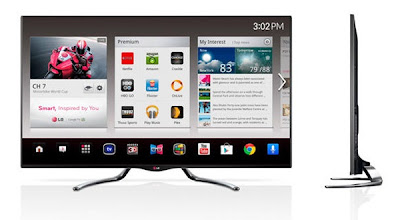
Asus Will Bring Google TV at CES 2013 User Guide - The three companies are Asus, Hisense and TCL. Meanwhile, Google co-existing as LG, Vizio, Sony, and others also set up a schedule to show the Google TV platform that has gained the update.
Google has been updating the new output TV platform in November, especially in terms of speed and accessibility.
TVs with Googles operating system looks alluring number of manufacturers that will be featured at CES 2013. At the prestigious event, Asus and several other manufacturers will showcase Google TV.
Google announced in a blog uploads that there are three companies that will reveal Google TV at CES 2013 next week.
Google also announced its plans to showcase YouTube as a feature in Google TV from LG, Panasonic and Sony Smart TV, at CES 2013.
ReadMore
 |
| Google Images |
TVs with Googles operating system looks alluring number of manufacturers that will be featured at CES 2013. At the prestigious event, Asus and several other manufacturers will showcase Google TV.
Google announced in a blog uploads that there are three companies that will reveal Google TV at CES 2013 next week.
Google also announced its plans to showcase YouTube as a feature in Google TV from LG, Panasonic and Sony Smart TV, at CES 2013.
Monday, September 8, 2014
ZTE NUBIA Z5 User Manual
Review ZTE NUBIA Z5 Specification User Guide - ZTE Nubia Z5 has a very slim body with size 138 x 69.2 x 7.6 mm, and the device weighs 126 grams. ZTE Nubia Z5 will be available in two colors: white and black.
ZTE Nubia Z5 is a high end Android device that comes with a touch Lcd measuring 5 inches with a full HD resolution of 1920 x 1080 pixels.
ZTE Nubia Z5 powered by quad-core 1.5GHz processor and 2GB of RAM, and this device comes using Android OS 4.1.1 Jelly Bean. Nubia Z5 ZTE is also equipped with HSPA + network support, WiFi a / b / g / n, NFC, Bluetooth, 32GB of internal memory, 13 megapixel camera, 2 megapixel front camera, and battery capacity 3.000mAh.
Specification of ZTE NUBIA Z5
ReadMore
 |
| Google Images |
ZTE Nubia Z5 powered by quad-core 1.5GHz processor and 2GB of RAM, and this device comes using Android OS 4.1.1 Jelly Bean. Nubia Z5 ZTE is also equipped with HSPA + network support, WiFi a / b / g / n, NFC, Bluetooth, 32GB of internal memory, 13 megapixel camera, 2 megapixel front camera, and battery capacity 3.000mAh.
Specification of ZTE NUBIA Z5
| Generals | Date Announced | December 27, 2012 (4th Quarter) |
| Status | Coming Soon | |
| Network Technology | - | |
| Processor/ Memory | CPU | 1.5GHz |
| RAM | 2GB | |
| Internal Storage | 32GB | |
| External Memory | - | |
| GPU | - | |
| Chipset | Qualcomm Snapdragon S4 | |
| Body | Dimensions (mm) | - |
| Weight (g) | - | |
| Available colours | - | |
| QWERTY Keypad | No | |
| Display | Screen Size, Resolution | - |
| Screen Color | - | |
| Design | Candybar | |
| Screen Protection | - | |
| Multitouch | No | |
| Software | Platform / OS | Windows Phone 7.5 Mango |
| Java (J2ME) | No | |
| Messaging | SMS | |
| Others | - | |
| Sound | Alert | - |
| 3.5mm Jack | No | |
| Extra Feature | - | |
| Battery | Battery Type/Capacity | NULL |
| Stand-by | - | |
| TalkTime | - | |
| Entertainment | FM Radio | No |
| TV Receiver | No | |
| Others | - | |
| Connectivity | HSPDA | Null |
| WLAN | No | |
| EDGE | No | |
| GPRS | ||
| WiFi Hot Spot | No | |
| GPS | No | |
| NFC Support | No | |
| Bluetooth | No | |
| USB Port | No | |
| Sensor | - |
Subscribe to:
Posts (Atom)