Showing posts with label BlackBerry. Show all posts
Showing posts with label BlackBerry. Show all posts
Monday, November 24, 2014
Recycle bin APP for blackberry the Best APP to Restore your Contacts
To restore your BlackBerry data from a previous backup session :
- Connect your BlackBerry to your desktop PC using the supplied USB cable or cradle.
- Run Desktop Manager and double-click Backup and Restore. This brings up the Backup and Restore screen.
- Click the Restore button.
- Navigate to the location where your backup .ipd file is stored, select the file, and click Open.
- At the prompt, click Yes to restore all of your original BlackBerry data from the specified backup file.
As with the backup function, you can choose to perform a selective restore on one or more specific databases, rather than choosing to restore all of your BlackBerry data. This option is useful if one of your application databases has been damaged or deleted or if you are moving to a different BlackBerry handheld and you want to move only certain data over from your old handheld.
- Connect your BlackBerry to your desktop PC using the supplied USB cable or cradle.
- Run the BlackBerry Desktop Manager application on your PC, and double-click the Backup and Restore icon from the main screen. This brings up the Backup and Restore screen.
- Click the Advanced button.
- Choose the file to restore from by clicking File Open.
- Navigate to the .ipd file you want to use and then click Open to select the databases you wish to restore from the Desktop File Databases section.
You can perform a selective restore from either a full backup or a selective backup.
Not only on pc computer or laptop, your blackberry is also available on application to restore data that has been deleted. Applications Recycle bin is also named.
Recycle bin APP on the blackberry is used only to Restore your Contacts, Memos, Calendar, Tasks, and Mails after deletion.
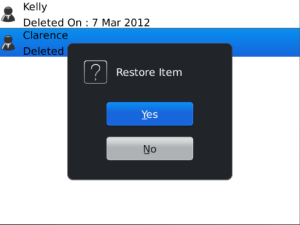
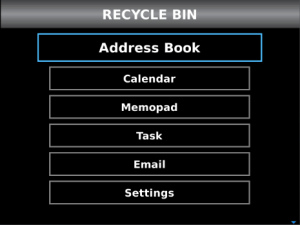
The recycle Bin stores all your deleted E-mails, Contacts, Tasks, Memo and Events in separate tabs. You can easily find your deleted items and then restore them back.
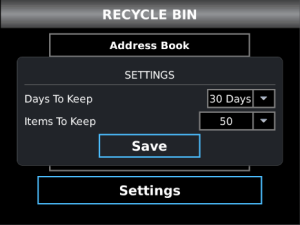
Use Recycle bin APP to Restore your Contacts, Memos, Calendar, Tasks and Mails.
Recycle bin APP features :- Stores your deleted items safe
- Items included in Recycle Bin are: E-mails, Contacts, Tasks, Memo and Events

Sunday, November 23, 2014
web based mail service using BlackBerry
This time I will explain how to make your BlackBerry is working with a number of web-based mail service.
If you are using your BlackBerry with your company’s enterprise mail server or if you are using your BlackBerry with your Internet service provider’s POP e-mail service, your BlackBerry is good to go as far as sending and receiving e-mail. However, many people who make use of web-based mail services, such as Gmail, Yahoo! Mail, or Hotmail, do not enjoy auto-matic access to their e-mail accounts on those services.

Gmail
Gmail service is one of the most popular free e-mail services available. Setting up your BlackBerry to work with Gmail requires you to first change your Gmail settings on the web and then configure your BlackBerry Internet Service (BIS) account to access your Gmail account. Perform the following steps:
- Log in to your Gmail account.
- Click Settings at the top of the Gmail page.
- Click Forwarding and POP in the Mail Settings box.
- Select either "Enable POP for all Mail" or "Enable POP for all mail from now on".
- Click Save Changes.
- Now go and log in to your BlackBerry Internet service account.
- Click the Profile link at the top of the page.
- Click Other Email Accounts in the e-mail accounts section of your BIS profile.
- Click Add Account.
- Now enter the information for your Gmail account, including e-mail address, username, and password.
- To complete the change, click Submit.
At this point, if your Gmail account has been properly set for POP access, you should be able to send and receive Gmail on your BlackBerry.

Yahoo! Mail
In order to integrate your Yahoo! Mail account with your BlackBerry, you must first subscribe to the Yahoo! Mail Plus service. (Unfortunately, regular Yahoo! Mail accounts are not supported.)- Log in to your BlackBerry Internet Service account.
- Click the Profile link at the top of the page.
- Click Other Email Accounts in the e-mail accounts section of your BIS profile.
- Click Add Account.
- Now enter the information for your Yahoo! Mail Plus account, including e-mail address, username, and password.
- Click the option “I have enabled POP access to my Yahoo! mailbox and want to add it.>>Then click Next.
- To complete the change, click Submit.

To integrate your iNotes account with your BlackBerry, perform the following steps:
- Log in to your BlackBerry Internet Service account.
- Click the Profile link at the top of the page.
- Click Other Email Accounts in the e-mail accounts section of your BIS profile.
- Click Add Account.
- Enter the information for your iNotes account, including e-mail address, username, and password.
- Under Lotus Notes/Domino, choose the option “I can access my mailbox using a Web browser (iNotes)".
- Click Submit.
- In the iNotes URL field, type the iNotes account URL. Be sure to include the location of the .nsf file and the connection type (http / https).
- Select the option “Leave messages on mail server.
- Click Submit.

Hotmail
To integrate your Hotmail account with your BlackBerry, you need to upgrade to MSNHotmail Plus, which is a paid subscription.
- Log in to your BlackBerry Internet Service account.
- Click the Profile link at the top of the page.
- Click Other Email Accounts in the e-mail accounts section of your BIS profile.
- Click Add Account.
- Now enter the information for your MSN Hotmail Plus account, including e-mail address, username, and password.
- To complete the change, click Submit.
Note that if you try this procedure with a regular (non-Plus) Hotmail account, you will receive
an error message such as “Cannot integrate the email account.
an error message such as “Cannot integrate the email account.

Outlook Web Access
To integrate your Outlook Web Access account with your BlackBerry, perform the following steps :- Log in to your BlackBerry Internet Service account.
- Click the Profile link at the top of the page.
- Click Other Email Accounts in the e-mail accounts section of your BIS profile.
- Click Add Account.
- Enter the information for your Outlook Web Access account, including e-mail address, username, and password.
- Under Microsoft Outlook / Exchange, choose the option "I can access my mailbox using a Web browser (Outlook Web Access)".
- Click Submit.
- In the Outlook Web Access URL field, type the Outlook Web Access account URL.
- In the Mailbox Name field, type the Mailbox name for your Outlook Web Access account.
- Select the option “Leave messages on mail server.
- Click Submit.
Friday, October 3, 2014
BlackBerry Curve 9220
 Get connected in an instant with the dedicated BBM shortcut key on BlackBerry Curve 9220 / 9320 smartphone. One touch launches the BBM app so you can chat in real time or share pictures, videos and files. Plan a night out with a group message, or chat privately one-to-one.
BBM is built into your favourite apps like Facebook and Twitter, so you can share your Facebook status update or latest Tweet without ever leaving the app.
Find and download more apps by visiting BlackBerry App World storefront. Whenever you download a new app, announce it to your BBM contacts through your BBM profile. Your contacts can even choose to download it themselves.
Listen to your favourite local stations on the built-in FM radio.1 Local news and music are now at your fingertips, so no matter where you are, you can always tune in to what’s going on around you.
Stay in touch when it counts. With the longest lasting battery yet in a 2G/3G BlackBerry Curve smartphone, you can get things done and connect with the people who matter most.
The next generation BlackBerry operating system (OS) is packed with powerful new features and innovative pre-installed apps. It delivers the smoothest and fastest BlackBerry experience to date. Plus, enjoy voice-activated universal search with Bing Auto Suggest in the BlackBerry Browser to find what you’re looking for hands-free.
With the Mobile Hotspot feature on BlackBerry Curve 9320 smartphone, you can share your Wi-Fi hotspot with up to five devices at once2. Pull up documents on your BlackBerry PlayBook tablet, use your BlackBerry smartphone and still have three other devices connected to Mobile Hotspot at once.
Enjoy the best in class QWERTY keyboard for easy BBM, texting and emailing in a slim design that looks great wherever you go.
Your BlackBerry Curve smartphone comes packed with features to make your life easier and more fun. Learn how to set up your email, download apps, personalise your smartphone and more.
(Source: BlackBerry)
List of videos:
Tech Specs:
| BlackBerry Curve 9220 | |
| General and Software | |
| Form Factor | Candybar |
| Operating System | BlackBerry 7.1 OS |
| Physical Keyboard | Full QWERTY keyboard – Optical trqackpad |
| Announced | 2011 April |
| Status Available | 2011 April |
| Browser & Internet | BlackBerry Browser, HTML, RSS |
| Display | |
| Size, diagonal | 2,44 inches – 61.98 mm |
| Display Resolution | qVGA 320 x 240 pixels |
| Generalized Pixel Density | 164 ppi |
| TFT LCD – Transmissive – 65K colors | |
| Connectivity | |
| WAN / Network 2G | GSM: 850/900/1800/1900 MHz |
| WAN / Network 3G | No |
| WAN / Data | GPRS / EDGE |
| Wireless LAN | 802.11 b/g/n enabled WPA/WPA2 Personal and Enterprise Cisco CCX certification Wi-Fi access to BlackBerry Enterprise Server Wi-Fi access to BlackBerry Internet Bundle Direct IP web browsing over Wi-Fi |
| Bluetooth | Bluetooth v2.1 + EDR + A2DP |
| Bluetooth Profiles | Headset Profile (HSP) Hands-Free Profile (HFP) Address Book Integration using AT commands Address Book Integration using OBEX (Object Push) Phone Book Access Profile (PBAP) Dial-Up Networking (DUN) Bluetooth Stereo (A2DP / AVRCP) Serial Port Profile (SPP) Secure Simple Pairing (SSP) A/V Remote Control Version 1.3 Bluetooth Message Access Profile (MAP) |
| USB | microUSB 2.0 – Mass storage – Charging connector |
| Audio jack 3,5 mm | 3.5 mm stereo headset jack |
| GPS / Location Based Services | GPS – BlackBerry Maps |
| Camera | |
| Camera Resolution (max) | 2.0 megapixels (1600 x 1200 pixels) |
| Camera secundary | No |
| Camera Focus | Fixed |
| Camera Flash | No |
| Camera Zoom (max) | Zoom digital 5x |
| Media | |
| Audio Player | MP4, .M4A, .3PG, .3GP2, .M4V, .AVI, .ASF, .MP3, .WMV, .WMA, .FLAC, .OGG, .AAC, .AMR, .WAV, .MID |
| Video Player | MP4, .M4A, .3GP, .3GP2, .M4V, .AVI, .ASF, .WMV, .WMA |
| Video Recording | Yes |
| Video Playback | Yes |
| Picture formats: .BMG, .JPG, .GIF, .PNG, .TIF, .WBMP | |
| Speakerphone | Yes |
| Loudspeaker | Yes |
| Radio FM | Radio FM Stereo |
| Voice Recording | Yes |
| Processor and memory | |
| Processor / SoC | Single core |
| RAM | 512MB |
| Internal memory | 512MB eMMC |
| Memory Card Type | microSD |
| Memory Card Size Supported | up to 32GB |
| Sensors | |
| Accelerometer | Yes |
| Digital Compass | Yes |
| Proximity Sensor | Yes |
| Ambient Light Sensor | Yes |
| Notifications | Polyphonic/MIDI/MP3 ringtones – Tone - Vibrate - On-screen - LED indicaton |
| Power | |
| Battery Type | Standard Li-ion battery 1450 mAh (J-S1) |
| Talk time | Up to 7 hours |
| Stand-by time | Up to 18 days |
| Music up to 28 hours | |
| Divers | |
| Messaging | SMS, MMS, IM, Email, Push Email |
| Games | Yes. Downloadable |
| Color | Black, Fuchsia Pink, Pure White, Teal Blue |
| Phone Book | Yes |
| Organizer | Yes |
| Agenda | Yes |
| Calendar | Yes |
| Task | Yes |
| Notes | Yes |
| Predictive text | Yes |
| Watch | Yes |
| Alarm | Yes |
| Diary | Yes |
| Calculator | Yes |
| Document Viewer | Yes |
| Flight mode | Yes |
| Weight | 102 grams (3.6 oz) |
| Dimensions | 109 x 60 x 12.7 mm (4.29 x 2.36 x 0.5 in) |
| Security: Password protection – keyboard lock – Sleep mode | |
| BBM (BlackBerry Messenger) Key | |
Gallery:


Friday, September 19, 2014
BlackBerry Torch 9810 Torch 2 Torch 9810 4G


| Tech Specs: BlackBerry Torch 9810 | |
| General and Software | |
| Other names or variations | BlackBerry Torch 2 BlackBerry Torch 9810 4G |
| Form Factor | Slider |
| Operating System (earliest) | BlackBerry OS 7.0 |
| Physical Keyboard | Slide-out QWERTY |
| Announced | 3 August 2011 |
| Status Available | 2011 August |
| Additional Navigation Control | Trackpad Touch screen with on-screen keyboard: portrait SureType, QWERTY and multi-tap, landscape QWERTY ESC key to right of trackpad Menu key to left of trackpad Keyboard backlighting |
| Browser & Internet | BlackBerry Browser -- HTML, HTML5 |
| Java | MIDP 2.1 |
| Display | |
| Size, diagonal | 3.2 inches |
| Display Resolution | VGA (640 x 480 pixels) |
| Generalized Pixel Density | 253 ppi |
| TFT, touchscreen, capacitive, 16M colors | |
| Connectivity | |
| WAN / Network 2G | GSM 850/900/1800/1900 MHz |
| WAN / Network 3G | UMTS 800/850/1900/2100 MHz |
| WAN / Data | GPRS / EDGE – HSDPA 14.4 Mbps, HSUPA 5.76 Mbps |
| 4G | HSPA+ / LTE (AT&T) |
| Wireless LAN | 802.11 b/g/n enabled WPA / WPA2 Personal and Enterprise Cisco CCX certified Wi-Fi access to BlackBerry Enterprise Server Wi-Fi access to BlackBerry Internet Bundle Support for UMA (carrier-dependent) |
| Bluetooth | Bluetooth v2.1 |
| Bluetooth Profiles | Headset profile (HSP): Hands Free profile (HFP) – Serial Port Profile (SPP) -- Stereo Audio -- SIM Access Profile (SAP) -- Dial-Up Networking (DUN) -- Message Access Profile (MAP) -- Address Book Integration using OBEX (Object Push) -- Phone Book Access Profile (PBAP) -- Secure Simple Pairing (SSP) |
| USB | MicroUSB 2.0 – Mass storage – Charging connector |
| Audio jack 3,5 mm | Yes |
| Infrared port | No |
| GPS / Location Based Services | GPS – Includes BlackBerry Maps |
| Camera | |
| Camera Resolution (max) | 5.0 megapixels -- 2592х1944 pixels |
| Camera secundary | No |
| Camera Focus | Continuous auto focus |
| Camera Flash | Yes |
| Camera Zoom (max) | Digital zoom 4x |
| Additional Camera Features | Image stabilization – Face detection – Geotagging -- Zero shutter lag -- Multiple picture-taking modes |
| Media | |
| Music Player | Audio formats: .mp4, .m4a, .3gp, .m4v, .avi, .asf, .wma, .mp3, .flac, .ogg, .aac, .amr, .wav, .mid |
| Video Player | Video formats: .mp4, .m4a, .3gp, .m4v, .avi, .asf, .wmv |
| Video Recording | 720p HD – 1280 x 720 pixels |
| Video Playback | Yes |
| Picture formats: .bmp, .jpg, .gif, .png, .tif, .wbmp | |
| Speakerphone | Built-in speakerphone |
| Loudspeaker | Yes |
| Radio FM | No |
| Voice Recording | Yes |
| M3/T3 (open position) rating for hearing aids | |
| Processor and memory | |
| Processor Clock Speed | 1.2 GHz |
| RAM | 768MB |
| Internal memory | 8GB onboard |
| Memory Card Type | microSD |
| Memory Card Size Supported | up to 32GB |
| Sensors | |
| Accelerometer (autorotate) | Yes |
| Digital Compass – Magnetometer | Yes |
| Proximity Sensor | Yes |
| Ambient Light Sensor | Yes |
| Notifications | Polyphonic/MIDI/MP3 ringtones – Vibrate -- On-screen or LED indicator |
| Power | |
| Battery Type | 1270 mAh removable, rechargeable lithium-ion battery |
| Talk time | GSM: up to 6.5 hours – UMTS: up to 5.9 hours |
| Stand-by time | GSM: up to 12.8 days – UMTS: up to 12.3 days |
| Music playback: Up to 54 hours – Video playback: Up to 7 hours | |
| Divers | |
| Messaging | SMS, MMS, IM, Email (IMAP, POP3, SMTP) |
| Games | Yes, downloadable |
| Color | Pure White – Zinc Grey – Black |
| Phone Book | Yes |
| Organizer | Yes |
| Agenda | Yes |
| Calendar | Yes |
| Task | Yes |
| Notes | Yes |
| Voice memo | Yes |
| Predictive text | Yes |
| Watch | Yes |
| Alarm | Yes |
| Diary | Yes |
| Calculator | Yes |
| Documend Viewer | Yes |
| Flight mode | Yes |
| Weight | 161 grams (5.68 oz) |
| Dimensions | Closed: 111 x 62 x 14.6 mm (4.34 x 2.44 x 0.57 in) Open: 147.6 x 62 x 14.6 mm (5.83 x 2.44 x 0.57 in) |
| Computer synchronization. OTA synchronization. Tethering | |
| Password protection: AES or Triple DES encryption with BlackBerry -- Enterprise Server -- Keyboard lock -- Sleep mode | |


Subscribe to:
Posts (Atom)