Monday, November 24, 2014
Recycle bin APP for blackberry the Best APP to Restore your Contacts
- Connect your BlackBerry to your desktop PC using the supplied USB cable or cradle.
- Run Desktop Manager and double-click Backup and Restore. This brings up the Backup and Restore screen.
- Click the Restore button.
- Navigate to the location where your backup .ipd file is stored, select the file, and click Open.
- At the prompt, click Yes to restore all of your original BlackBerry data from the specified backup file.
As with the backup function, you can choose to perform a selective restore on one or more specific databases, rather than choosing to restore all of your BlackBerry data. This option is useful if one of your application databases has been damaged or deleted or if you are moving to a different BlackBerry handheld and you want to move only certain data over from your old handheld.
- Connect your BlackBerry to your desktop PC using the supplied USB cable or cradle.
- Run the BlackBerry Desktop Manager application on your PC, and double-click the Backup and Restore icon from the main screen. This brings up the Backup and Restore screen.
- Click the Advanced button.
- Choose the file to restore from by clicking File Open.
- Navigate to the .ipd file you want to use and then click Open to select the databases you wish to restore from the Desktop File Databases section.
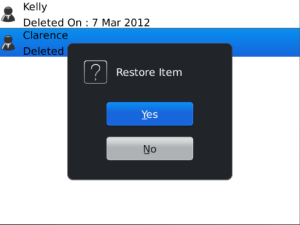
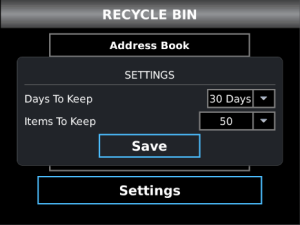
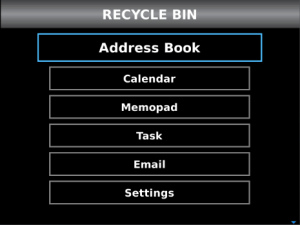
- Stores your deleted items safe
- Items included in Recycle Bin are: E-mails, Contacts, Tasks, Memo and Events

Sunday, November 23, 2014
WhatsApp climbed to 500 million active users
Saturday, November 22, 2014
How to play YouTube videos directly in VLC Media Player

In fact VLC Player can also play YouTube videos on your desktop without requiring the web browser or the Adobe Flash player and there are lots of benefits to watching YouTube videos in VLC.
The Benefits of Watching YouTube Videos with VLC
- First, You can skip any ads that might play before videos without needing to use a browser extension.
- Second, You can change the playback speed of videos, make it run slower or faster than the normal speed, which can help if youre trying to learn something new, like a dance.
- Third, You can watch the video in a smaller window while still doing other things on your computer. And finally, you can capture snapshots from the video easily through VLCs interface.
Follow the Tutorials to get started:
1. Launched the VLC player, press Ctrl+N to open the Network URL dialog.Or Click the Media menu in VLC, and then choose Open Network Stream.

2. Paste any YouTube video URL in the input box and click Play at the bottom!

Then, that’s all right. Now you can enjoy your favorite videos.Attention: In addition to YouTube, VLC Player can also play DailyMotion videos outside the browser.
Related article:
Sony does not intend to use the platform in its Android Wear
The official said the Gaza portable devices with "Sony" in the United States, "Ravi Nukala," the site "CNET," The company will continue to use its platform for the Bsaatha "smart watch", instead of moving to the platform "Android ware" which is planning " Google "through which to bring the operating system" Android "smart devices to wearable.
And contrary to the company "Sony" so rival companies that detect hours smart work platform "Android ware" new, like my company, " LG "and" Motorola ", and the" Samsung "which used the operating system" Android "in the first generation of their clocks smart" Galaxy Gear ", and then moved to adopt the open-source operating system" Teisen "in the second generation, which it called" Gear 2 "and" New Gear 2. "
The company "Sony" one of the leading companies in the smart subtract hours, it revealed a smart first hour in January 2012 and then launched last June her hour of second-generation "smart watch 2."
Dell tries to counter Apple with Precision M3800
Friday, November 21, 2014
6 simple tips to fix damaged smartphone you must know

When parts of our smartphones go wrong, we will immediately think of taking them to a service center. But many problems are either not covered in the warranty, or a heavy bill and inconvenience awaits the user. In fact, most of the time, the condition of your favorite gadget may actually not be as bad as it seems and you can easily fix the problem yourself by following some simple steps, and here are some tips.What you do if you’re Phone gets wet?
 If your phone gets wet accidentally, remove your phones battery immediately and then use a towel to dry the physical parts of the smartphone and once finish it, bury your phone and the battery in a bowl full of rice. The rice will absorb all the water and moisture from the device. You should never try to switch the phone on as it may cause short-circuiting in the phone and may lead to a bigger loss for you.
One of the best things you can do is to place the wet smartphone on the back of your PC monitor or TV Lcd over the heat vents. The conventional heat waves coming out of these devices are perfect to dry and fix your phone. Else, you can place the smartphone in front of the air conditioner as well. Since the cold air coming from the AC is dry, it will dry up your phone quicker than you may expect.
To be on the safer side you can later use a hair dryer to remove the remaining moisture and water from the phone, however, never use a dryer as the first solution. This will worsen the situation by blowing the water droplets into deeper areas of your phone.

The scratches that will appear on Lcd sooner if you using your smartphone without a Lcd guard.
But don’t be afraid, toothpaste can help you fix those scratches and make you phones Lcd as shiny as your teeth. Just put toothpaste on the Lcd and gently rub it in circular motion with a soft cloth or cotton and then wipe the whole thing with a soft and slightly damp cloth.
Note: Make sure it is a toothpaste and not a tooth gel.Stuck pixels
Stuck pixels are the dead pixels that appear on the smartphone Lcd as a stationary black dot or a bright white or red spot. You can try removing them by gently massaging the area around the stuck pixel with a soft cloth. By this method, you are allowing the pixel to reorient itself and regain color.Phone shuts-off randomly
If your phone shut off randomly for times, it shows that you have dropped your phone a good number of times or the battery is loose. When this happened, all that you have to do is to take a small bit of paper and fold it. Then open the back cover of your phone and insert the folded bit of paper between the edge of the battery and the edge of the phone, on the opposite side where the terminals of the battery are located. This will keep the battery firmly in place and stop your phone from shutting down.How to extend battery life?
Have you encountered this problem, recently you bought a new phone battery but it is losing charge within weeks? When face this problem, you can try keeping it in the refrigerator.
Keeping them in cold environment not only extends their life but also increases their power. But make sure that the batteries are wrapped in a poly bag or a zip lock bag while they are inside the refrigerator.
You can also try to solve the problem by turning off Lcds auto-rotate function, Bluetooth, reducing the Lcd brightness and GPS. If you are not really bothered about using the Wi-Fi and have an internet pack activated, you can switch off the Wi-Fi as well. However, if the problem still persists, it is likely a software issue and you must take your phone to a technician.Fixing crashed Android apps
An Android app can crash within minutes of downloading and can cause your phone to hang. Reasons can be many but you can fix it by following these steps. Pull the battery slowly from the phone. This step is called soft reset and doesnt affect data in your phone, but can help you resolve issues such as a crashed app.
Once your phone restarts, you can go to Google Play > My Apps and then click on the app to update it. If an update is not available then simply uninstall the app and then reinstall it.
If you really enjoyed this article, welcome to share your views and suggestion via comments.
Google Acquires Nest compared to 3 2 billion dollars
, and the company Nest industry many appliances to help control heat homes and alarms of fires. The best-known devices of this company is the remote control warmly home Thermostat, which is characterized by its simplicity and ability to learn automatically, to be able over time to understand the nature of the house, and know when to run the air conditioning or switch it off.
across Larry Page; CEO of Google, was delighted accession Nest company to the family of Google, praised the companys products and services stunning unique family. He noted that they are excited to offer great experiences to more homes in more cities in order to achieve their dreams.
said Tony Vadil; CEO of Nest, they are thrilled to joining Google, explained that the latters support will improve the situation is to build better products and simpler, and provide equipment to make life in the home easier , and adds a positive impact on the world.
, and will continue to work Bhacletha Nest and manages the current chief executive, and also to maintain its own brand. It is expected to close this deal in the next few months, after the completion of obtaining regulatory approvals in the United States.
clear that Google plans to revive the project, which raised a few years ago, which aims to control the house by Android devices, which we have not seen throughout the the last period.
Thursday, November 20, 2014
HTC equipped to detect One M8 Mini in May next year
Company intends "HTC" detected a miniature version of her new smart "and M 8" One M8, under the name One M8 mini, before the end of the first half of this year.
Well-informed sources in the British retail market, that "HTC" has set next May as the date for the detection of smartphone One M8 mini and put up for sale.
The sources revealed, in her remarks to the British 3G site, the new phone will get a screen measuring 4.5 inches, which is smaller than the screen supplied with the phone One M8, which is measured 5 inches.
The sources added that the mini version will not get on the system Duo Cameras located in the phone One M8, which is a system that consists of two cameras in the back of the phone to improve the quality of image capture and video recording.
And those statements come close with an earlier report revealed a number of phone specifications One M8 mini, where he confirmed for the device on a screen measuring 4.5 inch touch accurately HD, and processor "Snapdragon 400" quad-core processor, which works fast 1.7 GHz.
It is expected to get the mini version of the phone One M8 camera on background accurately 13 MP, does not support the technology, "Turapeixl" developed by "HTC", in addition to the random access memory capacity of 1 GB, and internal memory storage capacity of 16 GB.
The "HTC" intends to provide a new phone to the structure of the metal, and the interface "Sense 6" new, supplied by the phone One M8, as well as his support system "Android 4.4", known simply as "Kit Kat".
Tuesday, November 18, 2014
How to get the BeagleBone Black Drivers to work on Windows 8 computer
Heres a quick step-by-step guide:
1. Press win+c on the keyboard to bring up the charms side bar (or move mouse to right top corner of the screen)
2. Click the Settings button.
3. Click the Change PC Settings at the bottom of the sidebar.
4. On screen that shows up, select the General option from the sidebar then scroll down the page that appears.
5. Click the Restart now button under the Advanced startup section.
6. You will momentarily see the restarting screen, then it will switch to a blue screen titled "Choose an option"
7. Click the Troubleshoot button.
8. Click Advanced options.
9. Click Startup Settings
10. Click Restart
11. You should then see a Startup Settings screen after your computer reboots.
12. Press 7 or F7 on your keyboard to Disable driver signature enforcement
13. Now Windows 8 will continue starting up.
14. For Windows 8 64-bin: Log-in as normal, and then run BONE_D64.exe again (Click on Link to download)
15. For Windows 8 32-bin: Log-in as normal, and then run BONE_DRV.exe again (Click on Link to download)
16. Now you should see 4 warning dialogs about "unsigned driver installation", click OK for all of them.
Monday, November 17, 2014
How to choose the best for your home theater system
Sunday, November 16, 2014
Google Glass to reportedly hit Stateside AT T stores Will not says other sources
.jpg)
Google is taking all that steps to make their wearable Glass available for the public consumers. In the past we have see the American multinational corporation specialized in Internet-related services and products, announce promotional one day sales for interested Google Glass Explorers. Following this, lastly, Google has also opened up Glass Explorer program for their United States based customers, who is ready to spend some solid amount of 1500 United States Dollars for the pre-release Beta version headset.
Today, the leading smartphone tipster, evleaks came up with rumors suggesting, AT&T stores in America will be one of the first places to offer Googles new high-tech wearable Glass for the public customers. Unfortunately, we dont hear about any dates and time to expect the Glass availability, anytime soon. This is kind of surprising, as we have always seen the search giant selling most of their commodities from Google Play Store, not network carriers.
But for the most interesting fact, and to strengthen up our aforementioned words, the PHANDROID source updates tells us that, they have reached out to a Google spokesperson, who allegedly claimed that the company have no current plans to sell their product through AT&T stores in USA. Anyways, nothing here is just official yet.
Source: @evleaks, PHANDROID
15 Strong Reasons to Delete Facebook From Your Life Permanently
And even if your answer is Yes I can, I will pose a harder question: How much time can you live without your facebook account (without taking a small look on your feed)?.
In the reality this world (I mean facebook) become an addictive place where peoples spend their life on it without doing anything just up and down just like theyre painters.
If facebook was just for fun, no problem, but when everything and all your life is based on this website then it become a dangerous addiction activity because you will not have any goal in your life.
Thats why in this post on Netisia I will give you 15 strong reasons why you must delete your facebook account now and start your life.
1. Its Your First step to Success
Im always saying "The first step to success start by deleting your facebook account". I remember in the past week I saw a photo for Mark Zuckerberg saying"If I wasnt in Facebook, I will be in Microsoft".In the reality all of us if we werent on Facebook we will be in Microsoft or Google -_-.
A lot of peoples want to make a lot of money, success in their life, travel, enjoy life, do something original, and even change the world. But nothing come with sitting, if I ask you: What did you do to achieve your dreams? if the answer is "nothing" I guess because you dont have time to work on achieving your life because youre spending your life on Facebook.
So the first step is start searching and working on how to do it, how to change the world and do something make you proud of yourself. And this thing will never be sitting the hole day on facebook.
2. Youre Loosing Your Life
Life is shorter than spending it on social media websites, I remember before I create Netisia, I was sitting all the day on the computer so my family and my friends thought that Im doing something special and Im a computer geek so I got a lot of positive and negative says from them.The positive ones:
- My mother: One day you will become a computer engineer
- My friends: Wow, youre amazing in using and fixing computer how did you learn this?
- My cousins: Tech us
- Other cousins: Dont you have anything else to do except sitting the hole day in front of computer!!!?
- My father: You will destroy your eyes with this
- My father: Shut down that thing and go out! its very bad for your health!
3. Cause of Facebook:
- I start learning coding but I didnt continue
- I got bad marks on School
- Im wearing glasses
- Im Timid
- I dont go out of home
- I dont spend enough time with family
- If I wasnt on computer, Im on my smartphone
- When I go out peoples are surprised -_-
- I didnt enjoy the past 4 years of my life
- I dont finish anything (coding, designing, hacking, security, languages, reading, books, after effects, Photoshop, blogging, affiliate marketing...)
4. Find an Alternative to Facebook
Its a strong situation, and the essential problem here is: Peoples dont use their mind. I mean why you dont ask yourself:
is There any alternative to this?And if you search you can find, also you can visit Netisia every week for a weekly top 10 useful websites on the internet or just use StumbleUpon.
5. Enjoy Life
As I said in a previous point: Life is shorter than spending it on Facebook, so I think (and Im sure you think too) that there are a lot of things better than facebook (even eating or sleeping is better than that website).Theres no problem if you use it for 30 minutes per day, just to moderate your pages or something no-addictive. But when it takes all your day than we can say that its a serious problem.
6. Peoples will know you Better
Peoples just add everyone to their friends list then they say "I have a lot of friends Im popular"
- You dont know even if theyre real persons
- You dont know if that Girl is not a Boy
- You dont know if that friend is not a hacker
- You dont know if that person is just trolling you
- You dont know if they say the truth
- You dont anything about them
7. Or even Become a Millionaire
If youre one of those peoples who always ask"How to become a Millionaire with Facebook?"
I want to say "are you Mark Zuckerberg?"
No, Im not
Are you an Employee on Facebook?
No, Im not
So you cant become a Millionaire with Facebook.
If you want to become a Millionaire theres just one way, delete facebook from your life (Permanently) and start thinking about your future.
How Bill gates become a Billionaire (With B), How that Person become a Millionaire... the answer is "They Dont have a Facebook Account in that time". Its true that deleting your account is not enough but it will help you a Lot.
8. Become Healthier
If youre spending all your day and all your life on social medias than I want to tell you that a Big Maladies is coming to you. I hope this is not true, but my advice for you is to move and move.Practicing sport will not just make you healthier but also
- Its fun
- You mind will become better
- You will become creative
- More friends
- More Enjoying
- Its a chance to know yourself
- Train your body
- You will look cool
9. See World in the real image (travel)
One of things that peoples share on Facebook is the beautiful photos of other countries. Look my friends, the world is beautiful more than you think and more than you see it on the shared photos so try to see it yourself not like peoples see it.If you dont have enough money to travel (like me) just do something to earn some money like working, blogging, doing paid services...
10. The last Facebook updates
Facebook is doing a lot of updates every period but the last updates are very strange, did you know that facebook is doing a test on 700.000 user and you can be one of them.The website is based on personal information of peoples so 90% that these test are on those personal information that you dont want anyone to see it.
In the last period I was very busy so I dont have enough time to write about the last tech news on Netisia but I you can read this article to know what Im talking about.
11. Give your Opinion in The real Life is better
Some peoples use facebook just to express their opinions about a specific topic, this can be useful and good but dont you think that doing this in the Real life will be better and more effective?.12. The War on Privacy
The test that facebook do on 700.000 users is without their permission thats why the company receive many issues from many countries. So the question here is "does the company did previous tests on users without their permission?".
"People have really gotten comfortable not only sharing more information and different kinds, but more openly and with more people. That social norm is just something that has evolved over time." Mark Zuckerberg Said.
"... the default is now social." via Business insiderSo we can say that facebook is killing privacy under the name of "A Better Social Life".
13. Its hard to Delete Your Account
The company finally remove this feature, but you still can be tagged, spammed, and also I think your friends can also send you games invitations.
The problem here, addicted peoples will always reactivate their account as nothing happen thats why deleting your facebook permanently is harder than the other websites because it takes 14 days be deleted forever.
So the question is How to Delete My facebook account forever and Permanently
the company provide its users with a link to delete their account. Click here
- Click on Submit
- Write your Password and the Captcha code
- Click on Ok
14. Why you want to Use facebook?!
In the past points I give you the most important alternatives to facebook uses.- You want friends? go out and make new friends
- You want to read the news? a lot of blogs will provide you with the latest news
- You want to talk with your relations in the other countries? using skype is better and less addictive
- You want to be social? Facebook will not make you social
- You want to be a millionaire? think about your future
- You want to wast time? wast it on good and useful things
- You want to play games? what about doing some sports
15. Peoples enjoy being Addictive and Stupid
A lot of peoples are proud of being facebook addictive, and theyre proud because they dont have a life. Personally I think that this is a stupidity, because youre wasting your life there without any benefits while the company is earning Millions of $$$ from those addictive peoples.Saturday, November 15, 2014
What Do You Want To Achieve As A Web Designer
With the popularity and use of the internet on the rise, many people are looking at getting websites created in order to promote their businesses and services – putting web designers in hot demand. This has led to an increase in the number of paths that a designer can take their career on, but the decision in which path is best for you is one that you and you alone can make.
Why did you decide to become a web designer?
Answering this question will require you to go all the way back to the time when you first got into the profession or knew that it was what you wanted to do – what were the feelings, qualities or desires that compelled you to become a designer? Is this the career you wanted or is it merely a stepping-stone to bigger and better things?
By keeping in mind what made you want to become a web designer in the first place, you can help to ensure that you are happy in the path you ultimately choose.
So, where do you want to go as a web designer?
Now that you have determined what made you get into the design industry, you can start looking at the various pathways that are available to you as your career continues into the future. Remember that web design is a continuously broadening field, so you can really take it wherever you want.
Creativity
Those web designers that are attracted to the creative aspect of their job should consider aiming towards the creative director position in a internet-related firm. Or, you might want to branch out on your own and become an artist or a freelancer (although this is difficult for even the most dedicated designers to do).Flexibility
Those web designers that are attracted to the flexible hours of their job should consider starting their own business or firm (especially if they are already working freelance). This will allow you to decrease your already pretty flexible work schedule by passing off tasks onto others who are passionate about the creativity.Coding and Design
Those web designers that are attracted to the coding and design aspect of their job should consider branching out into web development, most notably into web applications. Even though Google and Facebook tend to be the leaders in this area, there is nothing stopping you from making your own mark.Money
Those web designers that are attracted to the monetary aspect of their job should look at all the areas that they can achieve this before deciding on a career path: joining an existing firm, starting your own business, becoming a creative director, or just plodding along the way you have been. There really is money everywhere when it comes to design.
Some questions to help you decide Even after you have determined what it was that made you want to become a web designer in the first place and you have determined what is most attractive about your job, you may still be having trouble deciding which path is the best for you. Answer the following questions to give you a better idea of where you would be most happy:
Do you want to do web design for yourself or for others?
Do you want to work with others, hire others to do your work or work by yourself?
Do you prefer the coding or the more visual aspects of design?
Do you want to write about or control design or do you actually want to do it?
Do new technologies get you excited or would you prefer to keep the whole thing simple?
What kinds of websites would you like to design?
Using the above questions and information, you will be in a much better place to decide on the direction you would like your web design career to take, and which paths would cause you to despise design’s existence. Don’t do the job that you think you should be doing – do the job that you love doing
Friday, November 14, 2014
How to Customize YouTube channel
Thursday, November 13, 2014
Theres a new smartphone coming up for LG reported to be G3 Mini
.jpg)
LGs record breaking smartphone and their 2014 flagship handset, G3 is too getting a new little sibling to add with, rumored to be named as LG G3 Mini, like any other front runner smartphones out there. This time we have got some details of the upcoming smartphone, that has reportedly made its way to New Delhi, India.
The countrys cargo import database, Zauba has got their latest shipment information of lately received air cargo, detailed on the internet. And if these are to be taken to our concern, they have shipped a new smartphone (sample phone) from LGs homeland, South Korea to India with the model numbers of LG D722. The new handset that took its flight to capital of the country seems to hold a screen of 4.5-inches, that is even smaller than last years G2s miniature version, that featured 4.7-inches screen and also whole one-inch smaller than the current G3 flagship, that sports 5.5-inches QHD panel.

The listing here also reveals the looming smartphone to have a Quad-Core processor of clock speed 1.2GHz, eight gigabytes of on board memory option, five megapixels main camera lens and finally a 2,100mAh powered battery. And from the words of TechnoBuffalo, the company might also have another additional options cooking deep in their pipelines for the G3 Mini smartphone, because earlier this year, LG had offered their G2 Mini in three different versions, from which two models were powered by a 1.2GHz Quad-Core Qualcomm Snapdragon 400 SoC of MSM8926 and MSM8226 kind, eight megapixels primary shooters, while the last one was shipped with a 1.7GHz NVIDIAs Tegra 4i chipset and 13 megapixels main lens. Comparatively, the LG D722 smartphone doesnt looks to fill the slot of a premium G3s miniature position, as reported by the source.
Source: Zauba, TechnoBuffalo
Tuesday, November 11, 2014
How to Install a Wireless Network
As more and more people move on from Dial up to broadband and connection to the information super highway there are new things like routers, modems that need to be setup in order to get online and start browsing. This guide is very basic and not too technical and hopefully it is helpful to those with little to no background in setting up wireless networks.
Cable companies tend to not give cable modems with wireless built in. Therefore you have to go find a good wireless router that works well. But which one?
I personally use the Linksys 2.4 Ghz wireless G router. This router gets approximately 54 Mbits/Second. This varies depending on the type of router you get. B is one of the first wireless types to come out. They get approximately 11 MBits/second, Wireless G gets approximately 54 Mbits/second and Wireless N gets approximately 74 MBits/second. The range of your wireless network also depends on the type of router you decide to get. I would recommend getting a Wireless G for an apartment and a wireless N for a huge mansion.
After you bring your router home, installation is pretty straight forward for the most part, follow the steps below for easy installation:
- Plug your wireless router as close as possible to your DSL or Cable modem.
- Your Wireless modem should be accompanied with a RJ45 cable, plug in one of the cable to a port in back of DSL modem and port most likely labeled "Internet" or "Uplink" of your Wireless router.
- Now both are connected, however setup is not complete. You will need another RJ45 cable connect it from any open port from back of your wireless router to the your laptop or desktop. The port should light up in front of your wireless router to indicate that a device is connected directly to your router.
- Depending on the device you get, you will need to go to one of the following IP addresses in order to setup security and configure your wireless network so that it is not used for free by your neighbors. Http://192.168.0.1 or http://192.168.1.1 Here you will be required to first setup a user name and password to enter the settings. Please note it down so you do not forget in case you need ever need to come back. We are not done just yet, this does not secure your wireless network from your free loading neighbors.
- Go to the wireless tab and setup your SSID it will need to be set to broadcast so when you have multiple devices that need to connect. Name it something simple and easy for you remember.
- Enter encryption code, this is very important, this will be the password you will need to know whenever you decide to connect a new device to your wireless network. Only devices that have the WEP key entered correctly will be able to connect to your network and use it to connect to the Internet. I would recommend using WPA Personal as your WEP Security Mode.
- Once you have your wireless device connected to your network you should be able to connect using wireless and will not be need to be stationary or confined to just one room of your apartment or home. If you have any questions about this hub feel free to contact me. I hope this hub was helpful to you.
Saturday, November 8, 2014
You need to wait until Summer for a Moto 360
.jpg)
Googles I/O Annual Developers Conference, yesterday had brought a list of new updates and announcements, from San Francisco, California, United States. Out of which, attendees and other media personals were most interested on the companys new wearable platform, Android Wear.
Head of Android, Chrome and Apps, Sundar Pichai had took the stage to talk a little about their new software platform, that was announced back in March with two multinational companies including LG and Motorola also unveiling their smartwatches, that runs the same platform, based on Android operating system. Last day we saw their third manufacturing partner, Samsung bringing-up their own wearable, well another smartwatch with Android Wear on board, named as Gear Live. In return, LG too disclosed their wearable G Watchs internal specifications and other details for the public, where Google is now having both the smartwatches listed on Google Play for a price of $199 for Samsungs Gear Live and $299 for LGs G Watch, respectively. But what about Motorolas Moto 360? Unfortunately, the companys new product is not yet ready for a consumer launch, and people from around here has let us know that, Motorola and Google will start selling the Moto 360 wearable device, after a few months from now, sometime soon in summer. The specification listings of the apparatus are too not confirmed at the moment, as Motorola hasnt let any information out, just yet. But, Pichai offered the attendees of the years I/O event with a chance to experience the round face UI of Android Wear OS on the smartwatch, aforementioned.
Sunday, November 2, 2014
How To Manage Lock Screen In Windows 8
Basic Lock screen contains the following information:
- Lock Screen Background Image.
- Today’s Date with time.
- Current status of available network and Battery status.
- Press Window + R key, this key combination will initiate/opens a new window on your monitor screen. This is known as RUN window.
- Then type “gpedit.msc” in the text box and press Enter key, this command will open “Group Policy editor” window.
- On the left panel of Window click on computer configuration, click on Administrative templates, and then click on Control panel. Now lists of option appears on left panel of screen, out of them click on Personalization.
- Then in the right pane of window you will get option to change configure the lock screen and Start menu.
- You can enable/disable lock screen through these option, change Lock screen image and Start menu background.
- Press Window + R key, this key combination will initiate/opens a new window on your monitor screen. This is known as RUN window.
- Then type “regedit” in the text box and press Enter key, this command will opens Registry Editor.
- A new window appears on your screen which contains list of registries files. You have to find the following registry:
- If you are not able to find create a new registry file DWORD NoLockScreen and set its value to 1 to disable it or set its value to 0 if you want to disable it.
- Then Restart your computer to make changes to take affect.
- Thats It!
Saturday, October 25, 2014
Download Android Apps Directly To PC
When you surf the Play Store, there is no option available to download the apps directly from your PC. But, there is an external web tool is available to download Android apps to PC. This online tool is provided by Evozi. Its a trusted site and why Im telling this is because you will be downloading the apps directly from the Google server not from the Evozi server.
Procedure
- Login to your Gmail account through PC (Gmail id which you used to sign in to Google Play via your Android device). If you skip this step, then you dont know whether the app available on the Play Store is compatible with your Android device or not.
- Go to Google Play Store and search for free Android apps.
- Click on the Android app that you want to download.
- Copy the url address which is given at the top of your browser.
- Then reach the Evozis site.

- Paste the copied url link at the text box which is provided.
- Click on "Generate Download Link" button.

Read: Humble New Tab Page-Chrome Extension
Wednesday, October 22, 2014
A Brilliant App to Hide Pictures Videos and Music On Android for Free
Launch the app, you would be amazed to see that there is no option available to hide anything. Instead of showing the hide options, it displays several volume adjusting features. It allows you to adjust the volume too. On the top, long pressing the Audio Manager title takes you to explore the original feature and purpose of this app.
Read: 13 Funny Google Searches
Below is the screenshot of Hide it Pros home screen.


