Showing posts with label App. Show all posts
Showing posts with label App. Show all posts
Monday, November 24, 2014
Recycle bin APP for blackberry the Best APP to Restore your Contacts
To restore your BlackBerry data from a previous backup session :
- Connect your BlackBerry to your desktop PC using the supplied USB cable or cradle.
- Run Desktop Manager and double-click Backup and Restore. This brings up the Backup and Restore screen.
- Click the Restore button.
- Navigate to the location where your backup .ipd file is stored, select the file, and click Open.
- At the prompt, click Yes to restore all of your original BlackBerry data from the specified backup file.
As with the backup function, you can choose to perform a selective restore on one or more specific databases, rather than choosing to restore all of your BlackBerry data. This option is useful if one of your application databases has been damaged or deleted or if you are moving to a different BlackBerry handheld and you want to move only certain data over from your old handheld.
- Connect your BlackBerry to your desktop PC using the supplied USB cable or cradle.
- Run the BlackBerry Desktop Manager application on your PC, and double-click the Backup and Restore icon from the main screen. This brings up the Backup and Restore screen.
- Click the Advanced button.
- Choose the file to restore from by clicking File Open.
- Navigate to the .ipd file you want to use and then click Open to select the databases you wish to restore from the Desktop File Databases section.
You can perform a selective restore from either a full backup or a selective backup.
Not only on pc computer or laptop, your blackberry is also available on application to restore data that has been deleted. Applications Recycle bin is also named.
Recycle bin APP on the blackberry is used only to Restore your Contacts, Memos, Calendar, Tasks, and Mails after deletion.
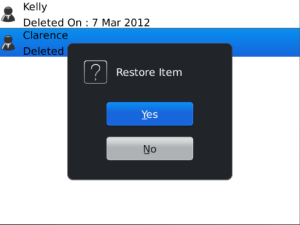
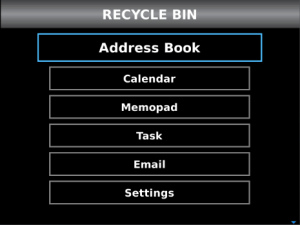
The recycle Bin stores all your deleted E-mails, Contacts, Tasks, Memo and Events in separate tabs. You can easily find your deleted items and then restore them back.
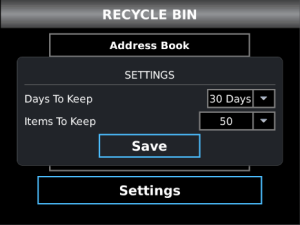
Use Recycle bin APP to Restore your Contacts, Memos, Calendar, Tasks and Mails.
Recycle bin APP features :- Stores your deleted items safe
- Items included in Recycle Bin are: E-mails, Contacts, Tasks, Memo and Events

Sunday, November 23, 2014
Accessing Android Hardware using Android System Info ASI APP
Android System Info APP for Android provides a lot of technical infos(Hardware, System, Telephony),Task Manager, App manager, logs viewer, battery stats and more.
Android System Info (ASI) APP provide low-level access to the increasingly diverse hardware
commonly available on mobile devices. The ability to monitor and control these hardware features
provides a great incentive for application development on the Android platform.
The hardware available include:
commonly available on mobile devices. The ability to monitor and control these hardware features
provides a great incentive for application development on the Android platform.
The hardware available include:
- Communications libraries for managing Bluetooth, network, and Wi-Fi hardware.
- A telephony package that provides access to calls and phone status.
- A multimedia playback and recording library.
- Access to the device camera for taking pictures and previewing video.
- Extensible support for sensor hardware.

In Android System Info (ASI) APP, you’ll take a closer look at some of these hardware particular. You’ll also learn how to monitor hardware sensors using the Sensor Manager. The accelerometer sensors will be used to determine changes in the device orientation and acceleration - which is extremely useful for creating motion-based User Interfaces - and lets you
add new dimensions to your location-based applications.
Finally, you’ll take a closer look at the communication hardware by examining the telephony
package for monitoring phone state and phone calls, as well as seeing what’s available in the
Bluetooth, networking, and Wi-Fi ASI.
add new dimensions to your location-based applications.
Finally, you’ll take a closer look at the communication hardware by examining the telephony
package for monitoring phone state and phone calls, as well as seeing what’s available in the
Bluetooth, networking, and Wi-Fi ASI.
Use Android System Info (ASI) APP to monitor and control these hardware features.
Some people are suspicious about permissions used in apps. As Android System Info APP use a lot of them, here are some explanations :- android.permission.READ PHONE STATE - Used to read telephony informations for the System tab.
- android.permission.ACCESS COARSE LOCATION - Used by admob.
- android.permission.INTERNET - Used for admob (to get ads) and also for flurry which gives me some infos for bugs tracking. A request can also be made to my server to check if a new version is available.
- android.permission.READ LOGS - Used to read logs for the Logs tab.
- android.permission.GET PACKAGE SIZE - Used to know applications informations, for Application Manager tab.
- android.permission.ACCESS NETWORK STATE - Used, in the System tab, to access betwork informations.
- android.permission.RESTART PACKAGES - Used by the task killer feature.
- android.permission.WRITE EXTERNAL STORAGE - Used to write logs to the sdcard.
- android.permission.CAMERA - Used to read camera informations. On some devices(like the motorola droid), accessing to camera info will make some sound.
- android.permission.ACCESS WIFI STATE - Used to read wifi informations.

Thursday, November 20, 2014
Facebook Official App now updated with awesome features for Windows Phone

Facebook just received an update to version 8.3.1.0, now gets the same features as the Beta, So we are now talking about to find important improvements, You will notice at first glance. Its interface is completely redesigned and Microsoft added new languages and more other awesome features.

The change log for the app bumps the version number up to 8.3.1.0 and adds the following new features:
- Interface design renovation
- Improved performance
- Improved Video Upload function
- New languages available
 This update will make you see your friends online, share updates, photos and videos. Also receive notifications when your friends leave you a comment on your posts and give "Like". So, Dont miss the power chat and have group conversations . All this you can do it from your smartphone comfortably.
Windows Phone Store : Facebook (Free)
Wednesday, October 22, 2014
A Brilliant App to Hide Pictures Videos and Music On Android for Free
Launch the app, you would be amazed to see that there is no option available to hide anything. Instead of showing the hide options, it displays several volume adjusting features. It allows you to adjust the volume too. On the top, long pressing the Audio Manager title takes you to explore the original feature and purpose of this app.
Read: 13 Funny Google Searches
Below is the screenshot of Hide it Pros home screen.

Then make a new numeric password. The default pin code is 8888
After that, it offers you to set up recovery E-mail. It lets you to retrieve your password in case if you have forgot it. Though its an optional feature, so you can skip it and do it later on.

Then relaunch the app, enter your pin/password. Then it screens many options to hide pictures, videos, music, apps, messages, files. Select as per your choice. Then click on + symbol to create a folder to hide files.

To lock apps, additionally you need to download App Locker Plugin. The plugin can only be launched from inside the Hide it Pro app. You dont see any icon on the app drawer.
Read: Play Nintendo Games on Android
To hide apps, it requires your Android phone must be got rooted.
Okay, if someone comes to know that you are hiding something on your phone, dont worry, it also has an extra brilliant feature. To dig it, click on Settings-->Login Settings-->Fake Password.

Enter a new fake password/pin. Then click OK.
Use this password/pin if you have ever got caught. Hence, this will make your pocket vault look empty and you will get escaped.
Saturday, October 18, 2014
SHAZAM Music Tracker Android App
First of all you need a stable Internet connection on your phone. Also dont forget to Switch On the Data traffic on your lovable android phone. Why Im telling this because many guys(including me sometimes) forgot to turn On the Internet connection on their phone and they simply open this app to track the music but at the end it result in vain because they have really missed chance to the grab the music in their pocket.
With net connection enabled on your phone, open the Shazam app and touch on Shazam logo telling you to tag now. Keep your phone close to the music that is playing. The music must be loud or at least you should be able to hear the music clearly. Then it recognizes music and media from your surrounding environment. Even though there is a loud noise around you, this app clearly track your required music. It takes a couple of seconds to match the audio with the Internet database.
If the music is not available on the Web or else the audio is said to be unauthorised one, it wont show the details. Instead it executes as " Sorry, a match could not be found for music". Its not a voice recording app also it cant recognize your voice though your are humming your favourite song which is available on the market.
Once you have tagged an audio, it shows the biography of the song or music with album name. Also it allows you to preview and save your tags. It gives more options such as you can buy the music or video from Amazaon, watch the video on Youtube, share your favourite tags with your cute friends through the leading social media such as G+, Facebook and Twitter or through e-mail.
Get the Shazam app directly from the Google Play Store.
In the Android Market, Shazam app ranked 4.5 stars out of 5 stars. Its a popular android app going to reach half million downloads. Definitely you too dont miss it.Cheers!!!
Monday, October 13, 2014
How to Activate Camera App and Play Tracks on a Lockscreen on Sony Xperia Z2 Tablet
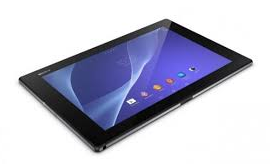 LockLcds dont normally allow users to launch any apps or even take photos. We still need to unlock our Lcds to use certain apps on our handset. But with Sony Xperia Z2 Tablet, you can take photos, record videos and play tracks without unlocking the Lcd. Heres how you can enjoy this feature on your Sony Xperia Z2 Tablet.
To take a photo on a lockLcd
1. Activate first your Lcd by briefly pressing the power key

2. Now activ the camera app
 by dragging the camera icon to the left across the Lcd.
3. And tap
 to take photos or record videos without unlocking your Lcd.
To play an audio on a lockLcd
1. Activate first your Lcd by briefly pressing the power key
.2. Now to display the music player controls, drag
 to the right across the Lcd.
3. And tap
 to play a track on a lockLcd.
To pause an audio track from the lockLcd
1. Activate first your Lcd by briefly pressing the power key
.2. When the music player controls appear, tap
 to pause the track.
To change the currently playing audio track on a lockLcd
1. Activate first your Lcd by briefly pressing the power key
.2. Then tap
 or
or when the music player controls appear.
Subscribe to:
Posts (Atom)