Showing posts with label use. Show all posts
Showing posts with label use. Show all posts
Saturday, November 22, 2014
Sony does not intend to use the platform in its Android Wear
The official said the Gaza portable devices with "Sony" in the United States, "Ravi Nukala," the site "CNET," The company will continue to use its platform for the Bsaatha "smart watch", instead of moving to the platform "Android ware" which is planning " Google "through which to bring the operating system" Android "smart devices to wearable.
And contrary to the company "Sony" so rival companies that detect hours smart work platform "Android ware" new, like my company, " LG "and" Motorola ", and the" Samsung "which used the operating system" Android "in the first generation of their clocks smart" Galaxy Gear ", and then moved to adopt the open-source operating system" Teisen "in the second generation, which it called" Gear 2 "and" New Gear 2. "
The company "Sony" one of the leading companies in the smart subtract hours, it revealed a smart first hour in January 2012 and then launched last June her hour of second-generation "smart watch 2."

Tuesday, October 28, 2014
Use Google as a Calculator and a Converter
Google has always been our first choice as a search engine, it offers us multiple functionalities. But most of us are not aware of this multifunctional search engine, have you ever used Google as a calculator with most of the scientific elements or as a parameter converter ?
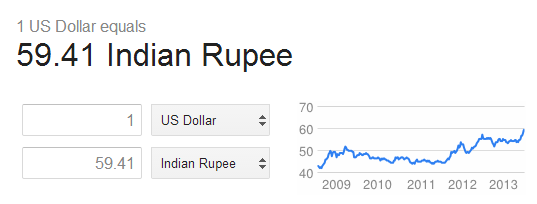
I think you havent. Though the downgrading Indian economy stands like a headache for everyone, somehow it helps me to know this Unique feature of Google, I was typing on my search bar 1 dollar= inr and Google instantly resulted a currency converter, similarly I got to know about the Calculator.
In this tutorial I am going to explain the process of finding out the Calculator and Converter in Google search. Being an association of Google, the operations will be resulted well in Google Chrome. Here I go.
Follow the following steps
1) Go to Google
2) Then type on search bar 1 dollar= inr, you will be redirected to the currency converter
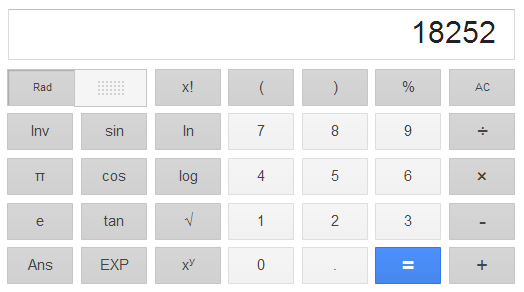
3) Now type 234*78 ( you can type your own ), this will result a calculator with some of the scientific operations like trigonometric functions, square root, logarithmic value, exponential value etc
4) Finally type 1kg=pounds to find out the Weight converter
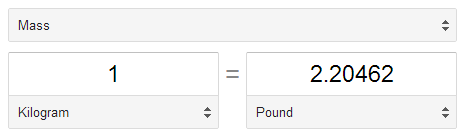
You can generalise this trick to find out the other parameter converters like temperature, length etc. Hope you like the tutorial. If you have any query feel free to ask.
Sunday, September 28, 2014
How to Use HTC Zoe on HTC One M7
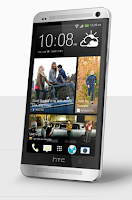
1. On your devices Viewfinder Lcd, tap
 to switch HTC Zoe on.
2. Once youre ready to capture, just tap
 .
.3. When the shutter release icon slowly turns to red
 , continue holding the phone steadily as it still captures a few seconds of shots.
Take note though that camera features like zooming is not available when youre using HTC Zoe feature. To add a little touch of creativity on those pictures, just open and edit them in the Gallery app.
Tuesday, August 26, 2014
How To Use the Claim Token in Technorati
How To Use the Claim Token in Technorati ? - Here I will share to you about how to use the claim token in technorati, To verify your blog using claim token in technorati is very easy. although technorati does not show you how to claim your token to verify your blog on Technorati. Here I will tell you how to verify the list of blog using claim token in technorati. below you can follow how to use the claim token in technorati
after creating an account on Technorati, you will receive an email with the following text from them.
"This email is automatically generated.
Thank you for submitting your blog claim on Technorati. Technorati will need to verify that you are a writer looking for a site http://bigpassage.com with a unique code. We have just commissioned ************ claims with proof of this claim. Please visit http://technorati.com/account/ for more details, including how to use the claim token. Thank you.
Follow these steps to verify your blog using claim token.
"This email is automatically generated.
Thank you for submitting your blog claim on Technorati. Technorati will need to verify that you are a writer looking for a site http://bigpassage.com with a unique code. We have just commissioned ************ claims with proof of this claim. Please visit http://technorati.com/account/ for more details, including how to use the claim token. Thank you.
Follow these steps to verify your blog using claim token.
Creating a new post (like this one) by using a panel of your blog.
Copy the code from your e-mail claims.
Paste your 12-digit technorati claim token in the post body.
Your blog will verify by following these steps
After verrification, you will receive an email from Technorati said something like this.
"Thank you for submitting your blog claim on Technorati. We have successfully crawled your blog and found the claim token, and your claim is now awaiting review." its easy right? may be useful mate, thank you
"Thank you for submitting your blog claim on Technorati. We have successfully crawled your blog and found the claim token, and your claim is now awaiting review." its easy right? may be useful mate, thank you
Subscribe to:
Posts (Atom)