Saturday, November 15, 2014
What Do You Want To Achieve As A Web Designer
With the popularity and use of the internet on the rise, many people are looking at getting websites created in order to promote their businesses and services – putting web designers in hot demand. This has led to an increase in the number of paths that a designer can take their career on, but the decision in which path is best for you is one that you and you alone can make.
Why did you decide to become a web designer?
Answering this question will require you to go all the way back to the time when you first got into the profession or knew that it was what you wanted to do – what were the feelings, qualities or desires that compelled you to become a designer? Is this the career you wanted or is it merely a stepping-stone to bigger and better things?
By keeping in mind what made you want to become a web designer in the first place, you can help to ensure that you are happy in the path you ultimately choose.
So, where do you want to go as a web designer?
Now that you have determined what made you get into the design industry, you can start looking at the various pathways that are available to you as your career continues into the future. Remember that web design is a continuously broadening field, so you can really take it wherever you want.
Creativity
Those web designers that are attracted to the creative aspect of their job should consider aiming towards the creative director position in a internet-related firm. Or, you might want to branch out on your own and become an artist or a freelancer (although this is difficult for even the most dedicated designers to do).Flexibility
Those web designers that are attracted to the flexible hours of their job should consider starting their own business or firm (especially if they are already working freelance). This will allow you to decrease your already pretty flexible work schedule by passing off tasks onto others who are passionate about the creativity.Coding and Design
Those web designers that are attracted to the coding and design aspect of their job should consider branching out into web development, most notably into web applications. Even though Google and Facebook tend to be the leaders in this area, there is nothing stopping you from making your own mark.Money
Those web designers that are attracted to the monetary aspect of their job should look at all the areas that they can achieve this before deciding on a career path: joining an existing firm, starting your own business, becoming a creative director, or just plodding along the way you have been. There really is money everywhere when it comes to design.
Some questions to help you decide Even after you have determined what it was that made you want to become a web designer in the first place and you have determined what is most attractive about your job, you may still be having trouble deciding which path is the best for you. Answer the following questions to give you a better idea of where you would be most happy:
Do you want to do web design for yourself or for others?
Do you want to work with others, hire others to do your work or work by yourself?
Do you prefer the coding or the more visual aspects of design?
Do you want to write about or control design or do you actually want to do it?
Do new technologies get you excited or would you prefer to keep the whole thing simple?
What kinds of websites would you like to design?
Using the above questions and information, you will be in a much better place to decide on the direction you would like your web design career to take, and which paths would cause you to despise design’s existence. Don’t do the job that you think you should be doing – do the job that you love doing

Friday, November 14, 2014
When the iPhone Become A Sniper Scope
| img via the video below |
But what make me surprised in this video is when I saw that one of players use his iPhone as a Scope for his Sniper.
Watch the video here (the iPhone appear at 5:30)
After watching this video, you can learn that peoples can make any device work on anything, who imaging that a smartphone can be a sniper scope.
This video is just an example, because other peoples use their phones for more than talking or surfing the net and facebook. You dont need even to buy special accessories to do this the steps are:
Attach an Apple iPhone to a scope, put it onto movie mode and hit record, its that easy to start filming airsoft games action as you will see from this video.With this post Im not telling you to transform your smartphone into a sniper scope or use it in wars, because I watched a lot of other videos for peoples who use their phones for new things.
Also in the past month apple shared a video for the unusual uses for the iPhone 5S, the video is called "Youre more powerful than you think" where the company show peoples that its last smartphone can be used in things other smartphones cant do it (its the idea of Apples video), so I think that the company must think about adding that its smartphone can be used also as a sniper scope.
You have something to say? leave a comment below and share this post with your friends to show them the power of iPhone
Thursday, November 13, 2014
Theres a new smartphone coming up for LG reported to be G3 Mini
.jpg)
LGs record breaking smartphone and their 2014 flagship handset, G3 is too getting a new little sibling to add with, rumored to be named as LG G3 Mini, like any other front runner smartphones out there. This time we have got some details of the upcoming smartphone, that has reportedly made its way to New Delhi, India.
The countrys cargo import database, Zauba has got their latest shipment information of lately received air cargo, detailed on the internet. And if these are to be taken to our concern, they have shipped a new smartphone (sample phone) from LGs homeland, South Korea to India with the model numbers of LG D722. The new handset that took its flight to capital of the country seems to hold a screen of 4.5-inches, that is even smaller than last years G2s miniature version, that featured 4.7-inches screen and also whole one-inch smaller than the current G3 flagship, that sports 5.5-inches QHD panel.

The listing here also reveals the looming smartphone to have a Quad-Core processor of clock speed 1.2GHz, eight gigabytes of on board memory option, five megapixels main camera lens and finally a 2,100mAh powered battery. And from the words of TechnoBuffalo, the company might also have another additional options cooking deep in their pipelines for the G3 Mini smartphone, because earlier this year, LG had offered their G2 Mini in three different versions, from which two models were powered by a 1.2GHz Quad-Core Qualcomm Snapdragon 400 SoC of MSM8926 and MSM8226 kind, eight megapixels primary shooters, while the last one was shipped with a 1.7GHz NVIDIAs Tegra 4i chipset and 13 megapixels main lens. Comparatively, the LG D722 smartphone doesnt looks to fill the slot of a premium G3s miniature position, as reported by the source.
Source: Zauba, TechnoBuffalo
Tuesday, November 11, 2014
How to Install a Wireless Network
As more and more people move on from Dial up to broadband and connection to the information super highway there are new things like routers, modems that need to be setup in order to get online and start browsing. This guide is very basic and not too technical and hopefully it is helpful to those with little to no background in setting up wireless networks.
Cable companies tend to not give cable modems with wireless built in. Therefore you have to go find a good wireless router that works well. But which one?
I personally use the Linksys 2.4 Ghz wireless G router. This router gets approximately 54 Mbits/Second. This varies depending on the type of router you get. B is one of the first wireless types to come out. They get approximately 11 MBits/second, Wireless G gets approximately 54 Mbits/second and Wireless N gets approximately 74 MBits/second. The range of your wireless network also depends on the type of router you decide to get. I would recommend getting a Wireless G for an apartment and a wireless N for a huge mansion.
After you bring your router home, installation is pretty straight forward for the most part, follow the steps below for easy installation:
- Plug your wireless router as close as possible to your DSL or Cable modem.
- Your Wireless modem should be accompanied with a RJ45 cable, plug in one of the cable to a port in back of DSL modem and port most likely labeled "Internet" or "Uplink" of your Wireless router.
- Now both are connected, however setup is not complete. You will need another RJ45 cable connect it from any open port from back of your wireless router to the your laptop or desktop. The port should light up in front of your wireless router to indicate that a device is connected directly to your router.
- Depending on the device you get, you will need to go to one of the following IP addresses in order to setup security and configure your wireless network so that it is not used for free by your neighbors. Http://192.168.0.1 or http://192.168.1.1 Here you will be required to first setup a user name and password to enter the settings. Please note it down so you do not forget in case you need ever need to come back. We are not done just yet, this does not secure your wireless network from your free loading neighbors.
- Go to the wireless tab and setup your SSID it will need to be set to broadcast so when you have multiple devices that need to connect. Name it something simple and easy for you remember.
- Enter encryption code, this is very important, this will be the password you will need to know whenever you decide to connect a new device to your wireless network. Only devices that have the WEP key entered correctly will be able to connect to your network and use it to connect to the Internet. I would recommend using WPA Personal as your WEP Security Mode.
- Once you have your wireless device connected to your network you should be able to connect using wireless and will not be need to be stationary or confined to just one room of your apartment or home. If you have any questions about this hub feel free to contact me. I hope this hub was helpful to you.
Saturday, November 8, 2014
You need to wait until Summer for a Moto 360
.jpg)
Googles I/O Annual Developers Conference, yesterday had brought a list of new updates and announcements, from San Francisco, California, United States. Out of which, attendees and other media personals were most interested on the companys new wearable platform, Android Wear.
Head of Android, Chrome and Apps, Sundar Pichai had took the stage to talk a little about their new software platform, that was announced back in March with two multinational companies including LG and Motorola also unveiling their smartwatches, that runs the same platform, based on Android operating system. Last day we saw their third manufacturing partner, Samsung bringing-up their own wearable, well another smartwatch with Android Wear on board, named as Gear Live. In return, LG too disclosed their wearable G Watchs internal specifications and other details for the public, where Google is now having both the smartwatches listed on Google Play for a price of $199 for Samsungs Gear Live and $299 for LGs G Watch, respectively. But what about Motorolas Moto 360? Unfortunately, the companys new product is not yet ready for a consumer launch, and people from around here has let us know that, Motorola and Google will start selling the Moto 360 wearable device, after a few months from now, sometime soon in summer. The specification listings of the apparatus are too not confirmed at the moment, as Motorola hasnt let any information out, just yet. But, Pichai offered the attendees of the years I/O event with a chance to experience the round face UI of Android Wear OS on the smartwatch, aforementioned.
Thursday, November 6, 2014
Upcoming LG G3 leaks again in a couple of new live shots
.jpg)
LGs next and upcoming front runner rumored smartphone, the G3 has again made to the internet, but this time its posing for the camera under some decent lights and better pixels. Courtesy of a Korean web domain, the phone is captured from its front and back.
The day before yesterday, we heard LG sending out its Press invitations to their Press Conference, about to take place in San Francisco, New York and London on 27th of this month, followed by Seoul, Singapore and Istanbul, the next day. We have been already rumored the dates to be of the South Koreans next big announcement to fall in line, if you know what we are meaning of. And when talking about the manufacturers past track records, LG tries to keep their devices deep down in their pipeline until the last moment.
It was just in cases and a blurred image, that made all the full proof for this smartphone, but matching our previous reports on the LG made unannounced G3 or internally codenamed B2, today too we see almost the same White color smartphone but with a misplacement in logo on the back and in higher clarity. And from the above photograph, its again showing off the firms redesigned back mounted hardware button with the main or primary camera accompanied by the volume up and down rockers right under the lens with a centered power or wake/sleep button. We also see a dual-tone LED flash light towards the right side of the main lens and a different sensor on the left, reportedly being a fingerprint scanner or a dedicated IR Blaster. On the bottom left corner we have the speaker setup.
From its front (below picture) we see the Lifes Goods new and upcoming handset featuring really thin or ultra-slim bezels on either sides of its display, something what we have seen the company doing last year with their G3 predecessor and current flagship phone, the LG G2. Previously rumored 5.5-inches screen of 2560 x 1440 resolution seems to fit well in slot for the huge looking smartphone out here. There is also LGs branding on the lower end of the device, alongside microUSB port, 3.5 millimeters headphone jack and microphone on the bottom side.
Other technical specifications from the past suggests us of seeing the phone get sanctioned from LG, with a Quad-Core Qualcomm Snapdragon 800 or 801 processor speeding at 2.3GHz, 16 and 32 gigabytes of internal storage (expandable via microSD card slot), two and three gigabytes of Random Access Memory, 13 megapixels main camera on the back with Optical Image Stabilization Plus technology and a 2.1 megapixels front facer, running Androids version 4.4 or 4.4.2 KitKat with LGs own refreshed Optimus User Interface over the hood. So it wont be a long wait until we see everything officially unveiled from the Koreans.
.jpg)
Source: SeeKO
Tuesday, October 28, 2014
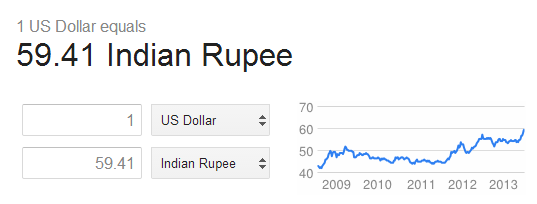
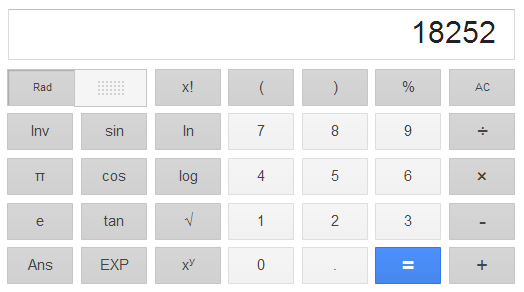
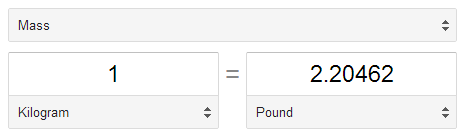
Use Google as a Calculator and a Converter
Wednesday, October 22, 2014
A Brilliant App to Hide Pictures Videos and Music On Android for Free
Launch the app, you would be amazed to see that there is no option available to hide anything. Instead of showing the hide options, it displays several volume adjusting features. It allows you to adjust the volume too. On the top, long pressing the Audio Manager title takes you to explore the original feature and purpose of this app.
Read: 13 Funny Google Searches
Below is the screenshot of Hide it Pros home screen.


Monday, October 13, 2014
How to Activate Camera App and Play Tracks on a Lockscreen on Sony Xperia Z2 Tablet
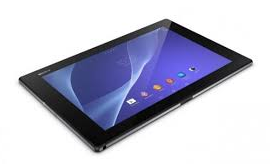 LockLcds dont normally allow users to launch any apps or even take photos. We still need to unlock our Lcds to use certain apps on our handset. But with Sony Xperia Z2 Tablet, you can take photos, record videos and play tracks without unlocking the Lcd. Heres how you can enjoy this feature on your Sony Xperia Z2 Tablet.
To take a photo on a lockLcd
1. Activate first your Lcd by briefly pressing the power key

2. Now activ the camera app
 by dragging the camera icon to the left across the Lcd.
3. And tap
 to take photos or record videos without unlocking your Lcd.
To play an audio on a lockLcd
1. Activate first your Lcd by briefly pressing the power key
.2. Now to display the music player controls, drag
 to the right across the Lcd.
3. And tap
 to play a track on a lockLcd.
To pause an audio track from the lockLcd
1. Activate first your Lcd by briefly pressing the power key
.2. When the music player controls appear, tap
 to pause the track.
To change the currently playing audio track on a lockLcd
1. Activate first your Lcd by briefly pressing the power key
.2. Then tap
 or
or when the music player controls appear.
Saturday, October 4, 2014
How to Add a Geotag on a Photo on Sony Xperia Z2 Tablet
Adding a location to those photos somehow adds relevance and it gives you that flashback of memories when you view those nicely captured moments. Well, this feature is not new any longer since its been there online and you often use them on photo-filtered websites. But with Sony Xperia Z2 Tablet, you can now add geotags on your photos right on your handset. Heres how you can add geotag on your photos.1. Open your photo gallery on your device.
2. When youre viewing a photo, just tap the Lcd and the toolbars will display.
3. Now tap
 to open the map Lcd.
4. Find and tap the desired location to put the map on the photo.
5. To adjust the location of the photo, just tap the location on the map to where you want to move the photo.
6. Tap OK when youre done and to save the geotag. You can then return to the photo viewer Lcd.
Friday, October 3, 2014
How to Start a Conference Call on Sony Xperia E

 .
.2. Then dial the number of the second participant and tap
 .
.3. When the second participant answers the call, the first call is put on hold.
4. Tap on
 to start the conference call. Repeat the same steps to add more participants to the conference call.
To have a private conversation with one of the participants
1. Tap the button showing the number of participants during the ongoing conference call.
2. Then tap on the name of the participant you wish to talk privately.
3. To end the conversation and return to the conference call, tap
To release a participant during the ongoing conference call
1. Tap the button showing the number of participants during the ongoing conference call.
 next to the participant you want to release from the call.
To end the conference call
1. During the conference call, just tap
.Saturday, September 27, 2014
How to Make Your LG Optimus L5 a Wi Fi Hotspot
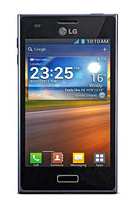
1. In the Application list, select Settings.
3. From the Wireless & Networks tab, tap Portable Wi-Fi hotspot.
4. Tap on Portable Wi-Fi hotspot.
You can also choose the options that you want to adjust. After turning on and choosing your options, on another device, locate your device’s name and connect to your mobile network.
When your phone is sharing its data connection, an icon appears in the status bar and as an ongoing notification in the notifications drawer.
Thursday, September 25, 2014
How to Send a Multimedia Message and Create a Slideshow on HTC One Evo 3D
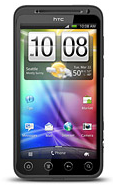
1. On your devices homeLcd, tap on
 and go to Messages.
2. Then tap on

3. On the To Field, key in a contact name, mobile number or email address. You can also send it to a group of friends by tapping on

4. To add a subject line, tap on
 and go to Add Subject.
5. Tap on the box that says Add text and there you can type in your special message.
6. Choose an attachment for your message by tapping on

7. After you browse and select an attachment, tap on Send or press
 to save it as a draft. You can also tap on
 to see options like replacing, viewing and removing your attachment.
Now if you wish your Mutimedia Message to reach an extra mile, you can have it on a slideshow format. Heres how you can create one:
once again and select Slide.2. Then choose where you want to insert the next slide.
3. When youre done adding the next slide, you can either do the following:
- tap onand choose to add a video or a photo
- tap onand then audio if you want to add a voice recording or a music to the slide
- tap on Add Text to add a caption
- tap onto view options like replacing, viewing or removing your attachment.
select Preview. If you dont see Preview, scroll down the menu. To view the playback controls, tap once the preview Lcd. or tap on Send to save message as a draft.